
Checks and fixes
Insights checks your site for broken or unfinished things, search problems, accessibility issues and how well AI assistants can read it, tells you what to fix next, and can fix much of it for you. A free report also grades any public website in about a minute.
The checks
Open Insights in the site's sidebar, under Growth. It has one tab per check, each with a count of what needs attention:
| Tab | What it looks at |
|---|---|
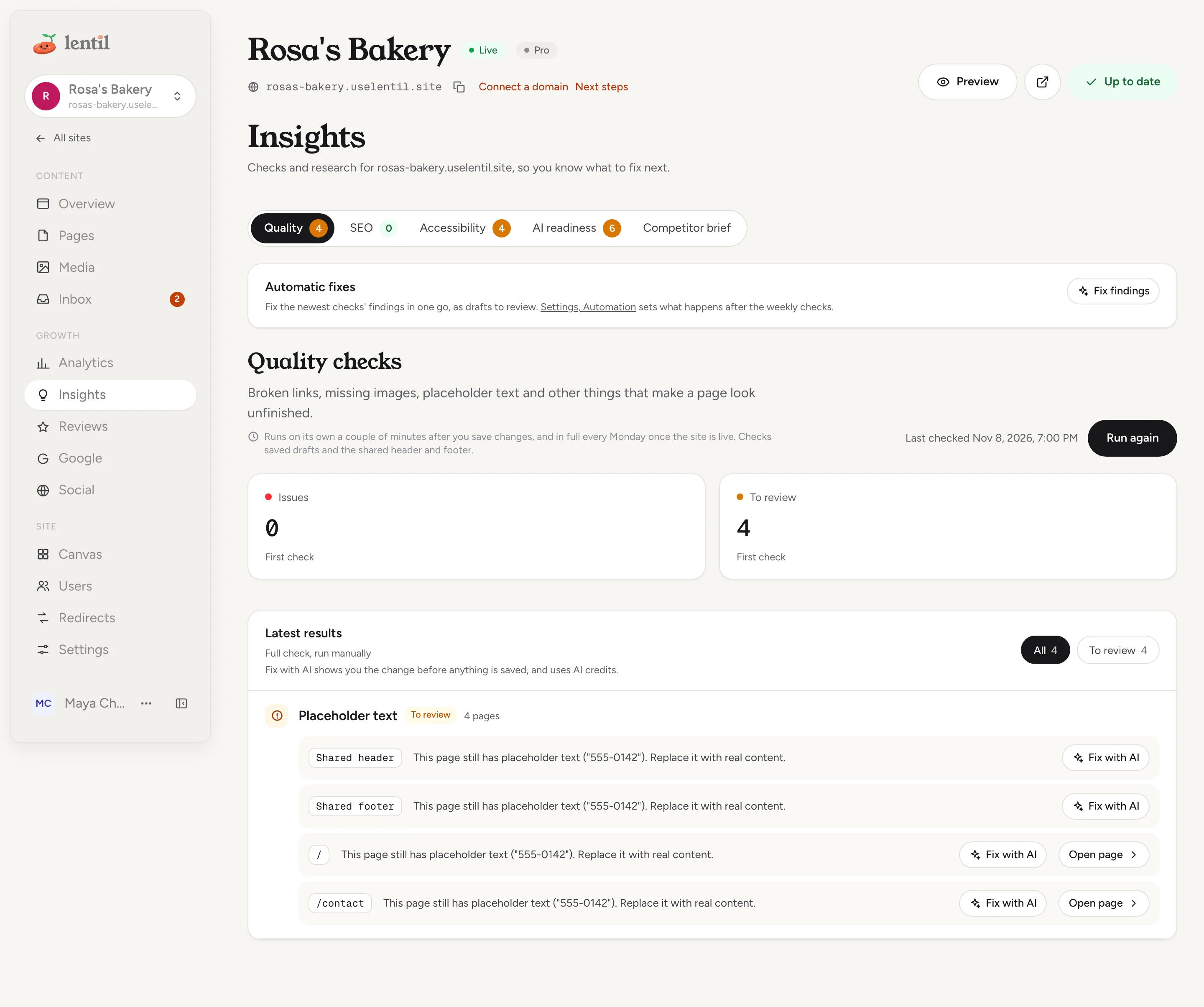
| Quality | Problems visitors notice: links to pages that do not exist, images that do not load, missing image descriptions, forms that do not reach you, placeholder text and other things that make a page look unfinished. |
| SEO | Titles, descriptions, indexing and structured data, page by page, as search engines see them. |
| Accessibility | Issues that make the site hard to use with a screen reader or keyboard, and that can affect ADA compliance. |
| AI readiness | What keeps AI assistants and AI search from reading, trusting and quoting your site. |
| Competitor brief | Fresh research on nearby competitors, and their websites graded next to yours. |
The checks look at your saved drafts and the shared header and footer, so you can fix things before you publish.
Run a check
- Open the tab you want and press Run check (it says Run again after the first run, except on AI readiness). On the Competitor brief tab the button is Research competitors, then Research again. The card shows Waiting to start, then Analysis in progress. You can leave the page while it runs.
- When it finishes you see how many Issues and items To review it found, each compared with the check before, and a trend of past runs.
- Under Latest results, each problem is one row, those with issues first: what visitors experience, how many times it shows and on how many pages, and one thing to do. Open Where they are to see each page it is on. Use All, Issues, To review or New to filter.
- Press Open page to fix a finding in the editor, or Open settings for a finding about site settings.
Issue is something that should be fixed. To review is something that needs your judgement. Findings that were fixed since the previous check are listed under Fixed since the previous check, and New marks the ones that appeared. Older runs stay available under the history list: open one to see what the site looked like then, and press Back to latest to return.
What the quality check looks for
- Links that go to a page that does not exist, or still go to your old website.
- Images that do not load, show no picture, or come from another website instead of your media library.
- Images without a description for people using screen readers.
- Pages without exactly one main heading.
- Forms whose messages would not reach you.
- Fonts that do not load, and placeholder text such as "Lorem ipsum". Sample email addresses and web addresses, and text in code examples, are not counted as placeholders.
- A header menu that does not fit on one line.
Repeats are grouped: eight links to the same missing page are one row that says so and lists the pages. The counts of Issues and To review, the history and the weekly report count only these visitor problems.
Run the SEO check on Rosa's Bakery and tell me the most important findings, page by page. Say which ones need me and which ones you could fix.Uses run_site_check, get_site_check, list_site_checks. Connect an assistant
Checks that run by themselves
- A couple of minutes after you stop saving changes, Lentil re-runs the Quality, SEO and Accessibility checks on the pages that changed. If nothing changed since the last run, it does not run again.
- Every Monday, once the site is live, all of the checks run in full. The AI readiness check runs without its AI review.
The label on a run says whether it was run by you or automatically. Running the AI readiness check yourself adds an AI review of the customer questions your pages leave unanswered, and that uses AI credits. The Competitor brief only runs when you ask, researches the web for a few minutes and uses AI credits.
Accessibility
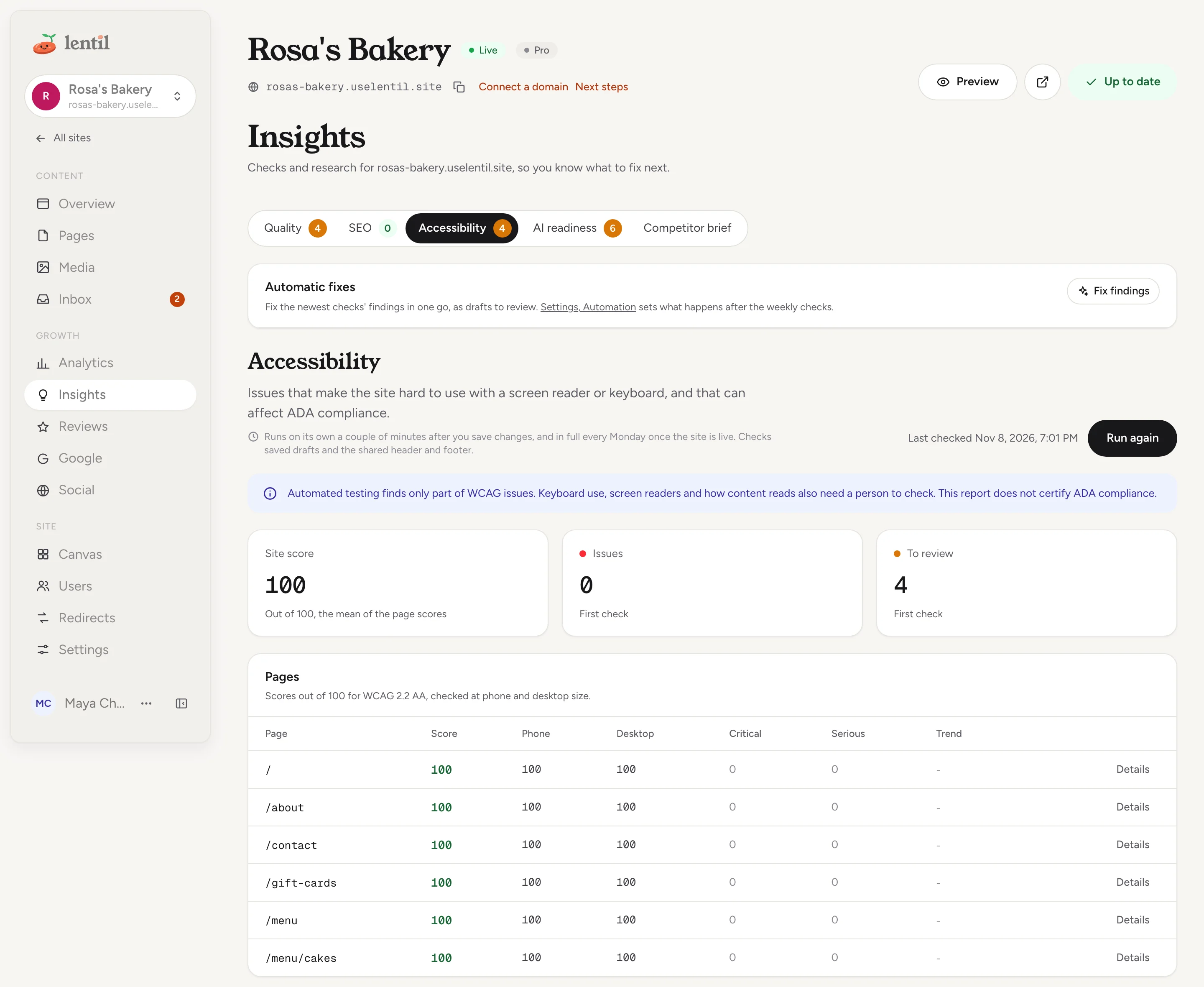
The Accessibility tab audits every page in a real browser at phone size and desktop size, against WCAG 2.2 AA, and scores each page out of 100. The Site score is the mean of the page scores, with a note on how it moved since the check before. Best-practice rules are shown for review but never lower the score.
- The table Accessibility score per page shows each page's score, issues and a small trend. Scores of 90 and above are green, 50 and above amber, and lower red.
- Press a page to open its issues. Each issue names the WCAG criteria it breaks (or says Best practice), the elements affected, and plain advice on how to fix it. Phone and desktop issues are merged into one.
- Issues in the shared header and footer are listed on their own, because they affect every page.
Not a certificateAutomated testing finds only part of the problems a site can have. Keyboard use, screen readers and how content reads also need a person to check. The report does not certify ADA compliance.
If the browser audit is not available, the check falls back to basic rules and says so: run it again later for the full audit.
Fix accessibility issues with AI
- On a page with issues, press Suggest a fix (also available for the shared header and footer).
- The dialog lists each change, element by element, before and after. Nothing is saved yet.
- Press Apply as draft. For a page, the fix is saved as a draft, and you publish the page to make it live. For the header or footer, the button is Apply to live site, because those go live on published pages at once.
The accessibility check runs again after the fix to confirm it. If the AI finds nothing it can change safely, the dialog says so and the advice under each issue tells you how to fix it in the editor.
Look at the newest accessibility check for Rosa's Bakery. Suggest a fix for the home page, show me exactly what would change, and apply it as a draft only after I agree.Uses get_page_accessibility, suggest_accessibility_fix, apply_accessibility_fix. Connect an assistant
Fix findings with AI
Findings with a fix button can be fixed for you. Press Fix with AI on a finding. A fix to a page is saved as a draft version you review and publish. A fix to the site settings, search text or shared header and footer opens a review dialog first (Review fix), where you see before and after and choose Apply as draft or Apply to live site. Once applied, the finding shows Applied, checking... and then Fixed, or Still found if the check still sees it. Some fixes, such as search indexing settings, cost nothing. Fixes made by AI show you the change before anything is saved and use AI credits. Findings that need you, such as writing a missing fact, say what to do instead.
On the Quality tab, a problem the AI can fix says Fix it for me: use Fix with AI on one place under Where they are, or, on a Pro site, press Fix all to fix that problem on every page in one batch. Fix all shows how many fixes it will make and about how many AI credits they cost, then saves the changes as page drafts for you to review and publish. The batch shows in the Automatic fixes card, where you can undo it.
Fix everything in one go
On a Pro site, the Automatic fixes card above the tabs has a Fix findings button.
- Press Fix findings. The dialog Fix the findings now? shows how many findings will be fixed and about how many AI credits it will cost.
- Press Fix as drafts. The batch runs in the background and saves page drafts. The header, footer and site settings are left alone.
- When it is Done, the card lists each change with Before and After, marked Draft to review or Live. Press Review and publish to open the page's history in the editor. Show N findings not fixed says why anything was left out.
To take a batch back, press Undo. Every page, the header, footer and settings it changed go back to how they were, and a page it published is published again as it was. Anything you edited since is kept. Credits are not refunded.
Automatic fixes every week
On a Pro site you can let Lentil act on the Monday checks. Open the site's Settings, then Automation, and choose what happens for each kind of fix:
| Kind | What it covers |
|---|---|
| Small fixes | Alt text, search titles and descriptions, form labels and button names, headings, broken links and search settings. |
| AI rewrites | Wording changes, new sections such as an FAQ. |
For each, choose Suggest only (issues stay in Insights), Fix as drafts or Write drafts (saved for you to review and publish), or Fix and publish or Write and publish. Publishing asks you to confirm first, because changes go live without anyone checking them, including the header, footer and search settings for small fixes. A page with unpublished changes only gets a draft.
The workspace owners get an email after each round that changed something, and Insights shows what changed with an Undo button for the whole round. Plans and prices are on Plans, billing and credits.
Show me what runs automatically on Rosa's Bakery each week. Then set small fixes to draft and leave AI rewrites off. Tell me before you change anything that would publish without review.Uses get_site_automation, update_site_automation, get_check_fix_batch, undo_check_fix_batch. Connect an assistant
The free website check
Anyone can grade any public website, no account needed, at app.uselentil.com/report. It is also the form on the Lentil marketing site.
- Type the address under Your website address and press Check my site. You may be asked to pass a quick human check.
- A page says Checking your site. It reads the home page and up to four more pages, and takes about a minute, up to two for big sites.
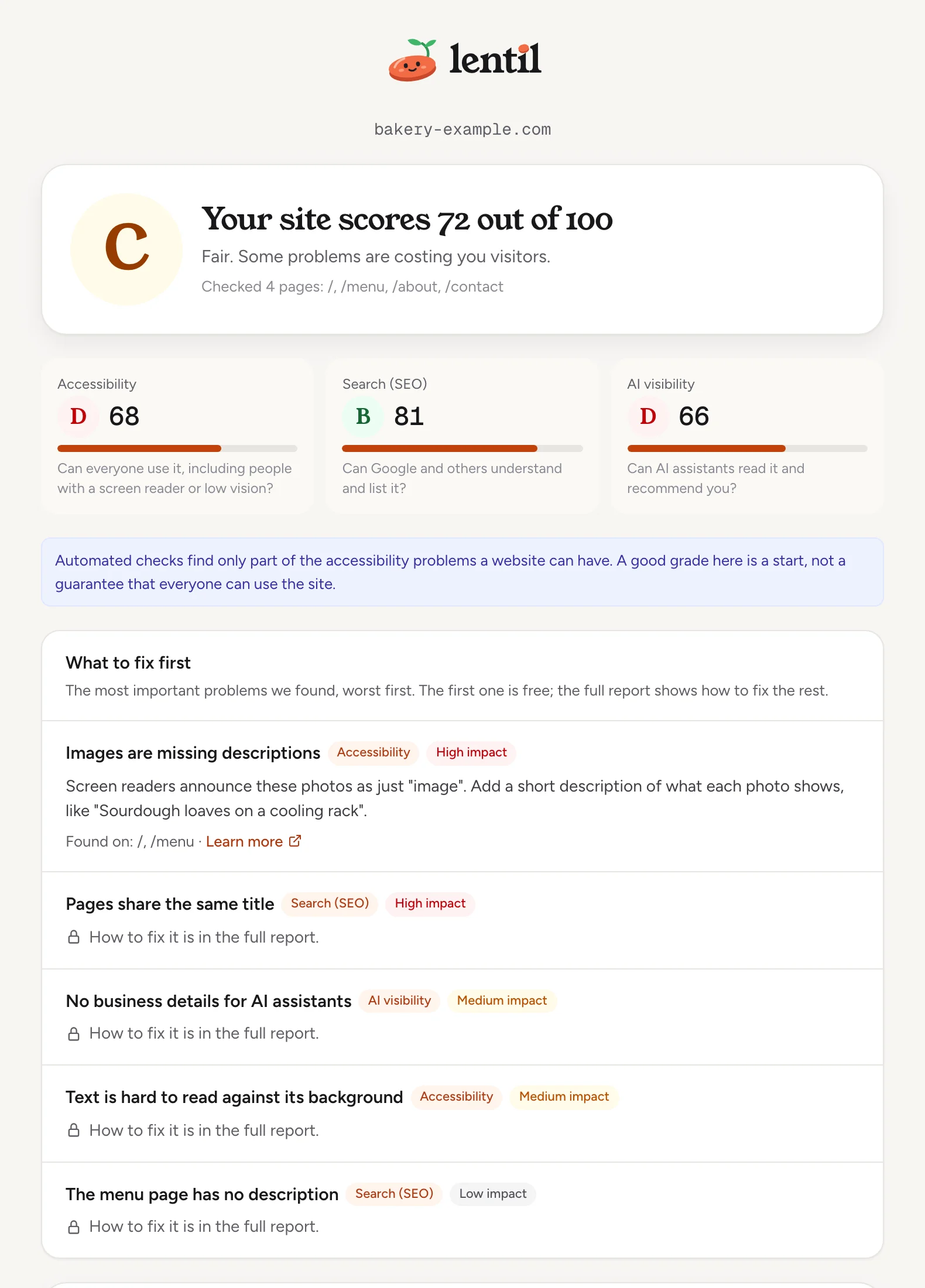
- The report shows an overall score out of 100 with a letter from A to F (A is 90 and up, B 80, C 70, D 60), and a grade each for Accessibility, Search (SEO) and AI visibility.
- What to fix first lists the most important problems, worst first, in plain words. The first one is shown in full. For the rest, type your email and press Email me the full report: we send a link with how to fix every problem, free. You can forward it to whoever manages your website.
The check only reads public pages and changes nothing. A site built on Lentil gets a button to open its Insights instead. If a site blocks automated visitors with bot protection, the report says it could not be read and asks you to allow the check. The same grade is available to assistants, see below.
Grade the website bakery-example.com with the free website check. Give me the overall grade, the three category grades and the five most important fixes in plain language.Uses grade_url, get_url_grade. Connect an assistant
Websites hosted elsewhere
For a website you keep with its current host, checks use saved observations of its public pages. Fixes stay manual: apply the recommendations in your website's own application or CMS, refresh its pages, then run the check again. Running a check needs permission to manage the site's settings, and the one-click fixes are not offered.
Who can use it
- Everyone with access to a site can read Insights.
- Running checks and fixing findings with AI need permission to edit content: owners, admins, members, and clients on a site shared with them. For a website hosted elsewhere, running needs permission to manage settings.
- Changing what happens automatically each week (Settings, Automation) is for owners and admins. Others see the current choice.
- Automatic fixes and Fix findings are Pro features. The free website check needs no plan and no account.
Limits and edge cases
- Automatic checks wait for 2 minutes without a save, and wait longer while pages are still being built.
- A batch fixes at most 25 findings. A finding fixed or tried in the last 7 days is not tried again, and findings that need you are left out.
- A batch stops when the workspace runs out of AI credits. Undoing a batch does not refund credits, and the undone fixes are not tried again for 7 days.
- An AI fix proposed more than 24 hours ago, or for a page that changed since, must be proposed again.
- The accessibility audit keeps up to 25 elements per rule and viewport.
- The free website check reuses a grade of the same address made in the last 24 hours, is limited per network (past it, wait a minute), refuses private and local addresses, and keeps reports for 90 days. Report pages are kept out of search results.
From an AI assistant
An assistant works as you, with your role. See AI assistants.
run_site_check,get_site_check,list_site_checks: run a check (quality,seo,accessibility,aiorcompetitors), read a run, and see past runs. Each finding says whether it can be fixed with a settings change, with AI, or needs you. Findings come 300 at a time: passnextOffsetasoffsetto read the rest, and use a finding'sindexto fix it. Quality runs also returngroups, the rows the app shows, each with itsfindingIndexes.includeBuilderRules: trueadds the AI page builder's own rules (page scripts, page-level CSS), markedbuilderRule: they are not problems for visitors and are never counted. An assistant can also fix findings itself with the page editing tools, which costs no credits.get_page_accessibility,suggest_accessibility_fix,apply_accessibility_fix: per-page scores and findings, a previewed AI fix, and applying it.propose_finding_fix,apply_finding_fix,discard_finding_fix: preview, apply or discard a fix for one finding.list_finding_fixesandget_finding_fix: the site's fixes, newest first, and one fix in full, with whether an applied fix held on the next check.fix_site_check_findings,get_check_fix_batch,undo_check_fix_batch: the Fix findings batch (Pro), its progress, and undoing it. Passonlywith a quality group'sfindingIndexesto fix just that problem, like Fix all.get_site_automation,update_site_automation: the weekly setting (owners and admins).grade_url,get_url_grade: the free website check for any public address, limited to 5 a minute per user.
Safety rules: page fixes are saved as drafts until you publish. Fixes to the header, footer or settings go live at once, so an assistant confirms them with you first. update_site_automation to publish should only be set after you agreed to changes going live without review. Undoing a batch changes live pages, so an assistant asks first.
Updated 9 November 2026