
Analytics
See who visits your site, which pages they read, where they come from and what device they use, without cookies and without a consent banner. Click any bar to filter everything to it.
Open Analytics
Choose Analytics in the site's sidebar, under Growth. Use Date range at the top to pick 7 days, 30 days or 90 days; the default is 30. A brand new site, or one nobody has visited yet, shows No visits in the last 30 days with its address and a Copy link button. Visits show up a few minutes after someone opens your site. Publish the site first if it is still a draft.
Analytics counts visits without cookies, so you do not need a cookie banner for it. Visits from a browser that sends a Global Privacy Control or Do Not Track signal count as page views only, not as visitors, and have no city. Bots and your own editor previews are not counted.
The numbers
- Visitors: unique per day, added up over the range. The same person on two days counts twice, because visitors cannot be matched across days.
- Page views, with the average pages per visitor.
- Form entries: messages sent through your forms, with the share of visitors who got in touch.
- Visitors from AI answers: visits that came from ChatGPT, Perplexity, Claude, Gemini or Copilot.
Each card shows the change compared with the period before of the same length, and a small trend. Below them, Page views and visitors per day charts every day of the range.
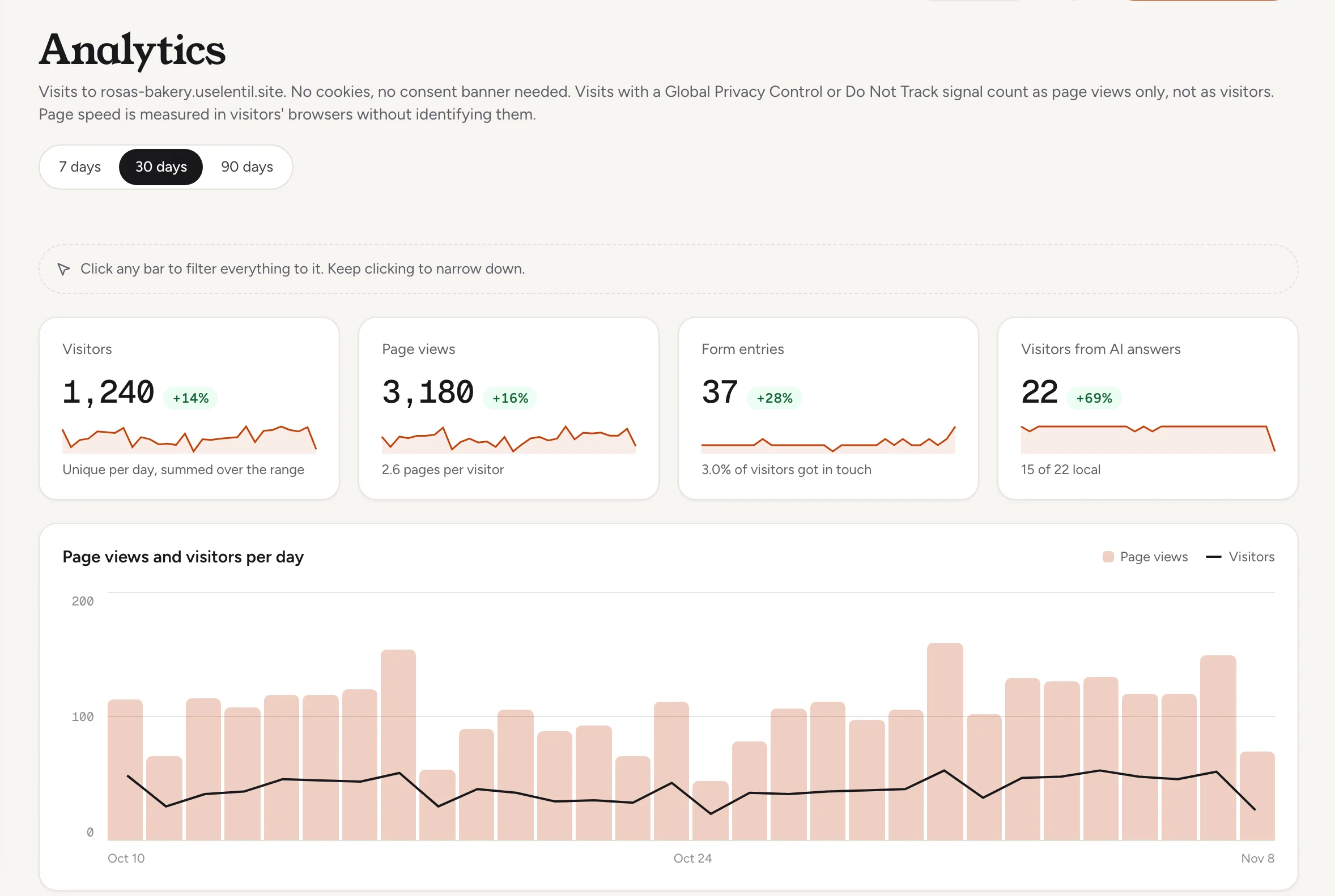
How much traffic did Rosa's Bakery get in the last 30 days compared with the 30 days before? Include visitors, page views, form entries and the top five pages.Uses get_site_analytics. Connect an assistant
Filter by clicking
Click a bar in any list, a day in the chart, a device card or a service area band, and every number on the page narrows to it. Keep clicking to narrow further, for example Mobile visitors from Google on one day. The bar above shows what you are looking at as chips. Press the x on a chip to remove it, or Clear all.
Each list ignores its own filter, so the other rows stay visible and you can switch. Form entries follow only the day and page filters. Changing the date range removes a day filter.
Pages, sources and people
- Top pages: the 10 most viewed pages.
- Where visits come from: Google, direct, social networks, AI assistants and other websites, as the top 10 sources.
- Where visitors are: switch between Cities, Regions and Countries. Locations are approximate and based on network location. A city needs at least 5 views to be named; the rest are grouped as Other cities.
- Service area: how many visitors are local (under 25 km from your business), regional (25 to 100 km) or elsewhere (100 km or more). It needs your business location: if it is missing you see Add your business location, which opens the site's settings.
- Devices and browsers: the share on mobile, desktop and tablet, and by browser.
If part of the range is from before Lentil recorded locations, a note says when location data starts.
Page experience
Page experience shows how fast the site feels to real visitors, measured in their browsers, at the 75th percentile for the whole site:
- Loading (LCP): how long the main content takes to show.
- Responsiveness (INP): how quickly the page reacts to taps and clicks.
- Visual stability (CLS): how much the layout jumps while loading.
- Server response (TTFB): how fast the server answers.
Each is rated Good, Needs improvement or Poor. A rating needs at least 10 samples, so a quiet site shows Not enough data yet. You also see loading by device and the slowest pages, which appear after 10 visits each. Some browsers do not report every metric.
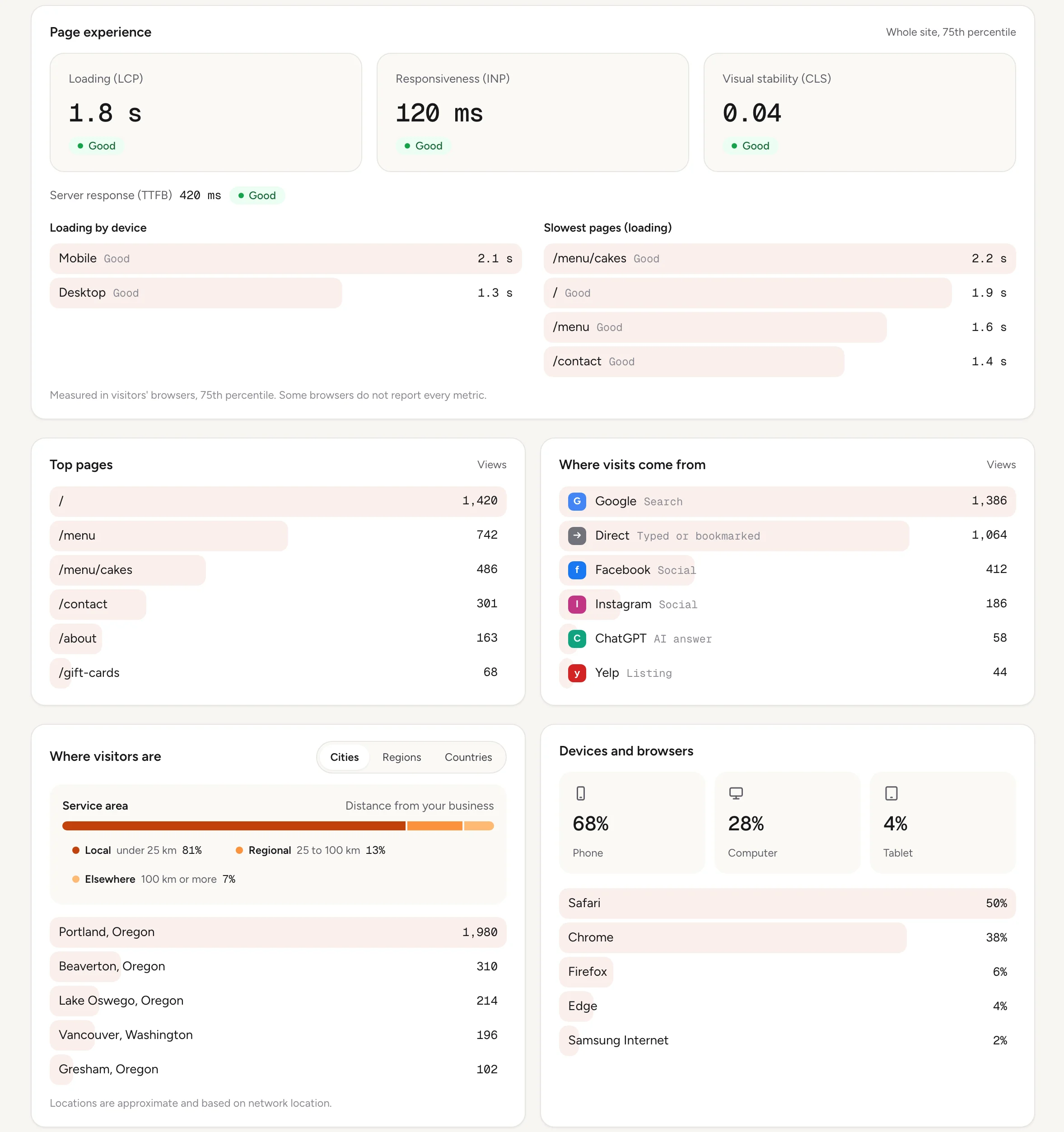
Where do the visitors of Rosa's Bakery come from, how many are local, and what share uses a phone? Check page speed too and tell me if any metric is rated poor.Uses get_site_analytics. Connect an assistant
AI visibility
Below the dashboard, AI visibility shows how assistants like ChatGPT, Claude and Perplexity read your site and send you visitors: visits from AI answers per day and by assistant, the pages people opened from them, Assistant reads for a user (a person's question made an assistant open a page), and AI crawler requests with which crawlers, what they read and which missing pages they asked for. Crawlers are verified by default; tick Include unverified crawlers to count the ones that could not be verified, which may be impersonators. Google AI Overviews count as Google search visits. If your settings keep AI crawlers out, a warning links to Search & sharing. How to get cited more is in SEO and AI visibility.
Are AI assistants reading Rosa's Bakery and sending visitors? Show me visits from AI answers by assistant over 30 days, which crawlers read the site, and what to do to improve it.Uses get_ai_visibility. Connect an assistant
Websites hosted elsewhere
For a website you keep with its current host, Analytics starts with a Website observations panel. It shows whether the tracking snippet is working: receiving when a verified installation sends page views, or the reason it is not, for example the snippet is not verified yet, tracking was disconnected, the verification expired, or no recent observations arrived. Usage and limits are listed under Observation usage and limits. Traffic appears once observations are received. Form entries, crawler requests and assistant reads are not available for these sites; AI visits are. See Already have a website for the snippet.
Who can use it
- Everyone with access to the site can read its Analytics: owners, admins, members, and clients on a site shared with them.
- There is nothing to set up: Lentil counts visits on every site it hosts.
Limits and edge cases
- Ranges are 7, 30 or 90 days.
- Lists show the top 10 rows. Cities with fewer than 5 views are grouped.
- Visitors are unique per day and summed, so a person who comes on three days counts three times.
- Locations are approximate. Visitors with a privacy signal have no city or coordinates.
- If Analytics cannot load, the page says traffic is unavailable and you can try again in a few minutes.
From an AI assistant
An assistant works as you, with your role. See AI assistants.
get_site_analyticswithsiteId,range(7d,30dor90d) and optionalfilters: page views and visitors per day, top pages, sources, countries, regions, cities, devices, browsers, service area, form entries and page speed, with the previous period.get_ai_visibility: AI referrals, assistant reads and crawler requests, with averificationchoice ofverifiedorall.
Both only read data. To act on what they find, an assistant can run run_site_check with the ai kind and fix its findings: see Checks and fixes.
Updated 9 November 2026