
Business profile
Your business profile is one set of facts about your business: its name, contact details, services, locations, opening hours and social links. Edit them once and your website, Google, search engines and AI assistants all use the same answers.
Where the profile lives
Open the site, then Settings. The first section is Business profile. For other kinds of site it is named for what the site is: About you for a portfolio, Product profile for an app or product, and Organization profile for a club or group. The same profile serves every kind; the kind decides which fields are shown and published.
At the top, a card shows Profile completeness as a percentage and lists what is missing. Beside it, Where these details show up lists what uses your facts.
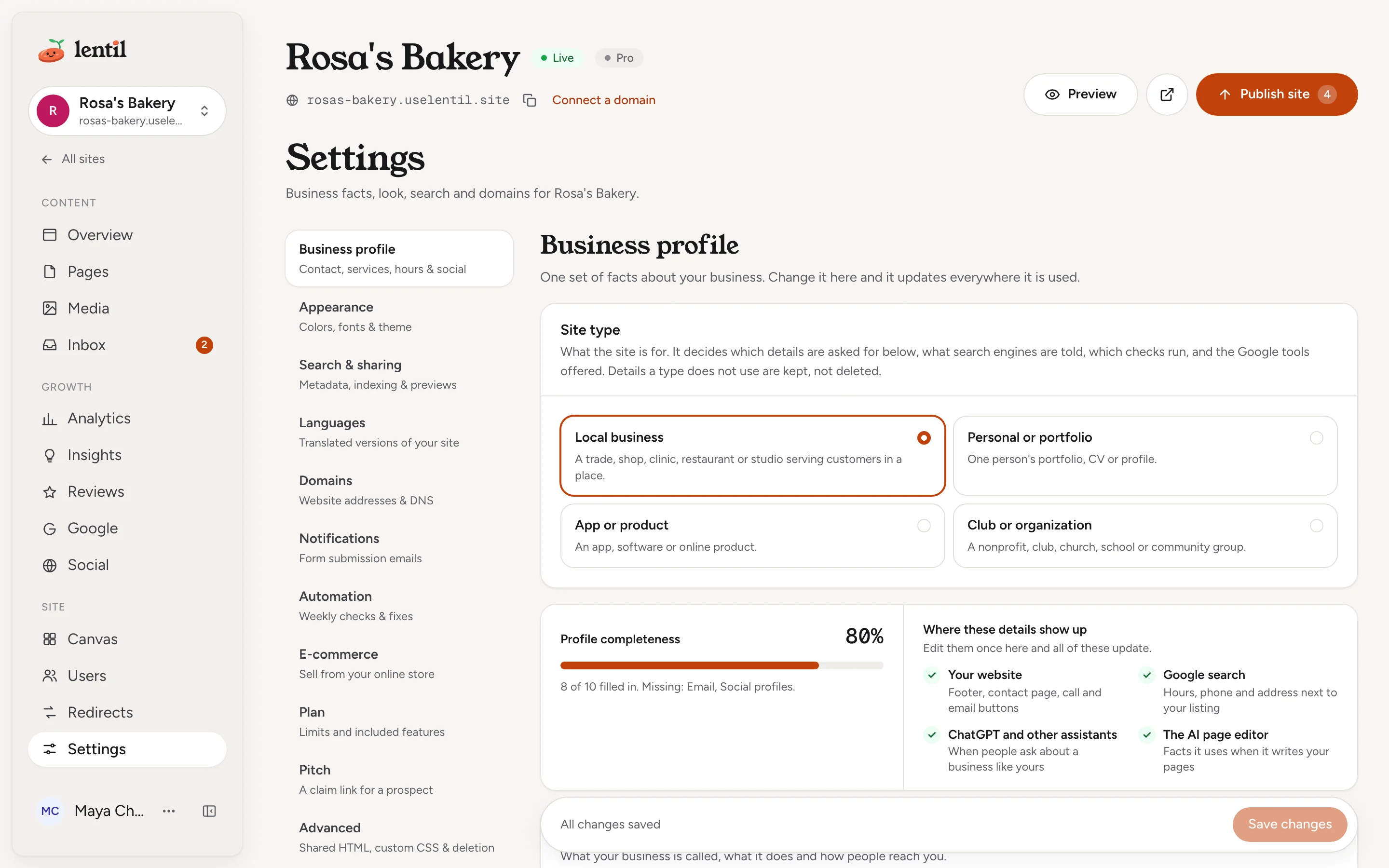
Where your details are used
| Where | What it uses |
|---|---|
| Your website | The footer, contact page, and call and email buttons. |
| Google search | Hours, phone and address next to your listing. For sites that are not a local business, your name, description and links in results. Search engines receive this as structured data. |
| ChatGPT and other assistants | Answers to questions like "when are they open?". Services also go into the site's llms.txt. See SEO and AI visibility. |
| The AI page editor | The facts it uses when it writes and edits your pages. |
Edit your details
- Open Settings and stay in the first section.
- Change the cards you need (see below).
- Press Save changes at the bottom. It then reads All changes saved.
Search information updates when you save. On a live site, pages are re-rendered; the notice tells you how many pages are being updated. Links and contact details inside your page text update the next time the AI editor builds or edits that page.
Each card has a tag showing where its facts stand: Unsaved, Edited (you changed it), Imported (read from your old website or Google) or Not set. On an edited card, press Use imported values (or Use defaults when nothing was imported) to drop your edits.
Identity and contact
- The name: Business name, Your name, Product name or Organization name, depending on the kind.
- Business type for a local business (for example "Bakery, plumber, restaurant..."), or Category for other kinds.
- Logo: press Choose (or Change) to pick one from your media. It also makes your site icons.
- Description: about the business itself. Each page can still have its own search description.
- Public phone number and Public email address.
- Service areas: cities or regions you serve, for "near me" searches. Type one and press Enter.
- Price range, such as "$$" or "$20-$50". It goes to search engines and is not shown on your pages.
Services
Add what you offer, each with a name, an optional price (free text such as "From $80") and one line about it. Use Add service, and the arrow to move a service up. Services feed the structured data, llms.txt and the text the AI editor writes. A product lists Features and a club lists Programs and services instead.
Locations
Press Add location to add one with a street address, City, State, ZIP, Country and an optional location phone. Give it a short name such as "Studio" when you have more than one. Mark one as Primary. Map coordinates (optional) opens latitude and longitude fields. For a portfolio, only the town and region are published.
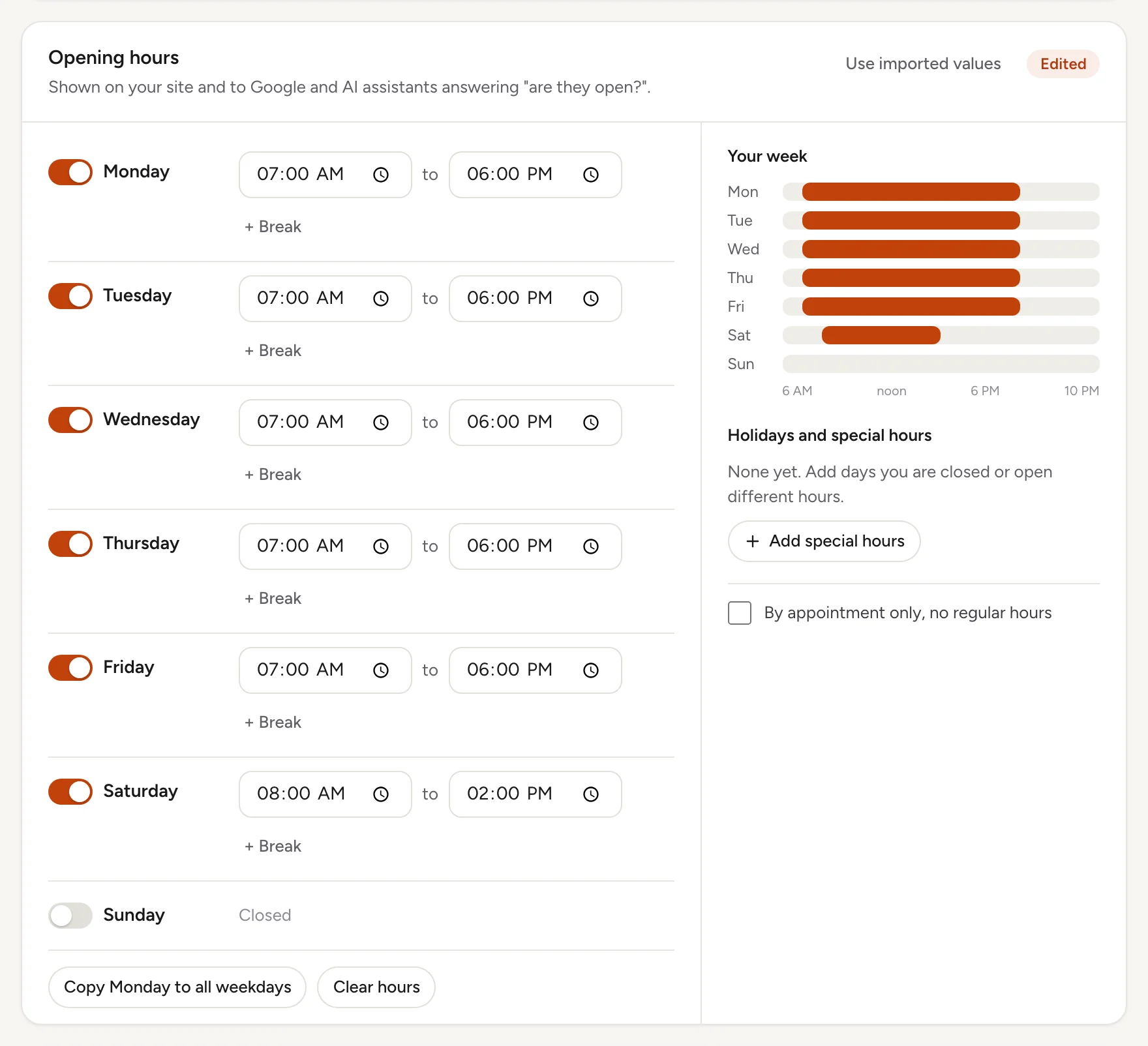
Opening hours
- Start from a common schedule, or turn each day on, set when it opens and closes, and press + Break to add a second period, such as after a lunch gap.
- Copy Monday to all weekdays saves typing, and Clear hours starts over.
- Press Add special hours for a holiday or a break. Give it an optional name, a first and last day, and choose Closed or Open with other hours.
- Tick By appointment only, no regular hours when you have none. Hours are then not published, and search data lists none.
Hours matter most: AI assistants answer "when are they open?" from them, and the completeness card flags them when they are missing.
Social profiles
Press Add profile, choose the platform and paste a link or a handle such as @rosasbakery. Three switches per profile: On, Show on website and Tell search engines.
Keep it consistentUse the same name, address and phone as on your Google Business Profile. If you link one, Lentil can compare the two and use Google's values. See Google Business Profile.
Update the business profile for Rosa's Bakery: open Monday to Friday 7am to 6pm, Saturday 8am to 2pm, closed Sunday. Add a special closing on December 25. Show me the profile after.Uses get_business_profile, update_business_profile. Connect an assistant
What your kind of site shows
Every kind keeps the same profile, but a kind only shows and publishes the fields that make sense for it. Hidden fields are kept and come back if you change the kind.
| Kind | Section name | Does not use |
|---|---|---|
| Local business | Business profile | Nothing hidden |
| Portfolio | About you | Service areas, price range, opening hours, by appointment, mission, involvement |
| App or product | Product profile | Service areas, price range, opening hours, by appointment, work, mission, involvement |
| Club or group | Organization profile | Price range, by appointment, work |
The kind also changes what search engines are told about you (a local business, a person, a software application or an organization), how strict the checks are about phone and address, and whether you can link a Google Business Profile listing. Change it with Site type at the top of the section.
Who can use it
- Owners, admins, members and clients can all edit a site's business profile. Everyone who can open the site can read it.
- The profile and its completeness card are on every plan. Changes go live on published pages right away.
Limits and edge cases
- A site can list up to 30 services or features, up to 50 locations, and up to 20 social profiles.
- Location fields allow up to 300 characters each.
- A special hours entry needs a last day that is not before its first day.
- Completeness counts ten facts: name and type, description, phone, email, service areas, services, address, opening hours, social profiles and logo. Only the facts the kind uses count, and a phone and address count only where the kind needs contact facts.
- Your own edits always win over imported values. A fact left empty is never invented on the site.
- A social profile that is not a valid address or handle shows an error under the field.
- If a section has an error, the bar at the bottom offers a Review button for that section, and Save changes stays off until it is fixed. Discard throws away unsaved changes.
From an AI assistant
An assistant connected to Lentil works as you, with your role in each workspace. See AI assistants to connect one.
get_business_profile: the effective profile, plus the manual edits on top of imported data.update_business_profile: change only the fields passed.nullremoves an edit (restoring the imported value), and an empty string or list clears a field.operatingHours.regularHourshas exactly 7 days, Sunday first, with times as HH:MM (24 hour).byAppointment: truemarks a business with no regular hours.update_site_kind: change what the site is for, which changes which fields are shown.create_siteaccepts abusinessProfilewith the facts you gave, saved with the new site.
Safety rules: update_business_profile goes live on published pages immediately. An assistant should check facts such as hours and phone with you, because wrong ones cost calls.
Updated 9 November 2026