
Domains
Every site starts on a free Lentil address. When you are ready, put it on your own domain: connect one you already own, or buy a new one inside Lentil. Your email keeps working, and the free address keeps working too.
Your free address
Every site has a free address that works from the start and never stops, even after you add your own domain. Find it in Settings, Domains, under Free address, with a copy button. It also shows in the site's header, with Connect a domain beside it.
Every plan can use your own domain, Free included. On a Free site, connecting or buying a domain needs a verified email address: if yours is not verified yet, the domain screen says so, and signing in again with the code we email you verifies it. Prices are on Plans, billing and credits.
Connect a domain you already own
- Open your site, choose Settings, then Domains. Or press Connect a domain in the site's header.
- Type your domain, for example
rosasbakery.com, and press Check my domain. Lentil looks up where the domain is managed, what email service it uses, and what website it opens today. If you came from a website Lentil already read, your domain is filled in for you. - Follow the one next step Lentil shows. If your provider supports one-click connect, you see Connect with your provider: sign in there the way you always do and approve one change. Lentil never sees your password.
- If not, or if you press Show me the steps instead (or Show me how), you get guided steps for your provider: where to click, which values to copy, and a live check that updates every 30 seconds as you work.
- When the change is made, Lentil checks it, turns on HTTPS (the padlock), usually within 10 minutes, and emails you. You can close the page in the meantime.
Lentil makes www the main address, for example www.rosasbakery.com, and the plain rosasbakery.com sends visitors to it. If your old website already sent www to the plain address, the plain address stays the main one. Visitors to either now see your new site. If Lentil cannot tell where the domain is managed, pick your provider from the list under Pick where your domain is managed, or follow the general steps with Show general steps.
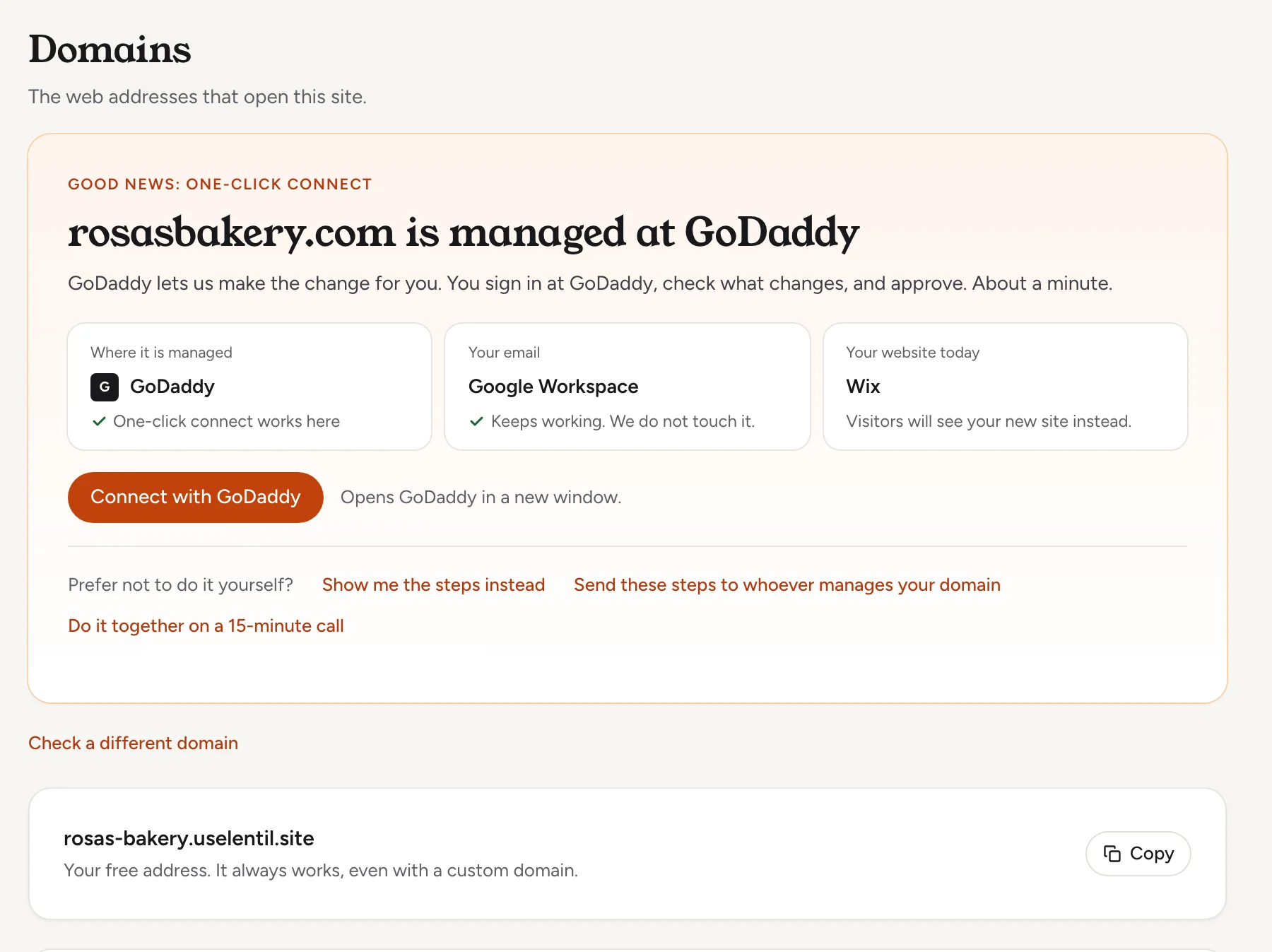
Your email is not touchedLentil only points your website records at your new site. Email that runs on the domain keeps working, and the steps never ask you to change email records or nameservers.
Connect rosasbakery.com to Rosa's Bakery. Find out where the domain is managed, and tell me the easiest way to connect it and what I need to do myself.Uses detect_domain_provider, start_domain_connect, start_guided_connect, get_domain_steps, check_domain. Connect an assistant
Get help connecting
You do not have to make the change yourself. Both options are on the connect screen under Prefer not to do it yourself?
Send the steps to whoever manages your domain
- Press Send these steps to whoever manages your domain.
- Optionally type Their name and Their email, and leave Email me when your domain is connected ticked.
- Press Send steps to email them, or Get a link to send yourself to copy a link and send it by text or WhatsApp.
They open a page with only the steps for your domain, with a live check. No account and no password are needed. The link works for 14 days. Open helper links are listed under your domains, and you can turn one off there.
Do it with us
Press We will do it with you to pick one of two ways. Book a 15-minute call opens a booking page: you share screens, you click and we tell you where. Where your provider has a collaborator role, you can instead Add us as a collaborator: follow the steps shown, then press I sent the invite. We connect the domain within 1 business day, then remove our access and email you. We never ask for your password.
Buy a new domain
- Open Settings, then Domains, and find the Get a domain card. It lists names that are free right now for your site. Use Search for a name to look for another.
- Press Buy and connect next to a name.
- In the dialog, check the owner details under Domain owner (they are filled in from your business profile; the required ones are first and last name, email, phone, address, city, state, postal code and country). The registrar emails this address once to confirm the owner, so confirm it within 15 days to keep the domain active.
- Check the price, then press Confirm purchase. With no saved card, you pay in Stripe Checkout.
- Lentil registers the domain and connects it for you. The domain shows Setting up with progress through Bought, Records added, Checking records and HTTPS. It usually takes a few minutes, and you get an email when it is live.
Privacy protection, DNS and HTTPS are included. The new domain becomes your main address, and the free address sends visitors to it. You will not need to copy any records.
Domains cannot be refunded once registeredIf a payment is declined, nothing is charged. If Lentil cannot register the name, you are refunded. Only a workspace owner can buy a domain; others see Ask an owner.
Suggest available domain names for Rosa's Bakery in Portland. When I pick one, show me the full quote, the renewal price and the owner details you would register it under, and only buy it after I say yes.Uses suggest_domains, buy_domain. Connect an assistant
Manage your domains
Each domain in Settings, Domains has a status: Waiting for DNS, Active, Needs attention, Setting up (a bought domain still connecting), Paused (a Free site that was inactive, see below) or Disconnecting. A note under it says what to do.
| What | How it works |
|---|---|
| Check now | Lentil checks automatically. Press Check now to check right away. A domain waiting on DNS is checked every few minutes at first. |
| Show steps | Returns to the guided steps for a connection that is still waiting. |
| Make primary | With more than one active domain, Make primary picks the one everyone sees. The others send visitors to it. |
| Remove domain | The trash button asks you to confirm and says visitors will no longer reach the site through this domain. Your free address keeps working. If disconnecting fails, press Retry disconnect. |
| Add a domain by hand | For experts: press Show all details, type any hostname and add its DNS records yourself from the table (Type, Name, Value, Status). Each address connects separately. |
| www and the plain domain | A daily check tells you if the plain domain stops forwarding to www or loses your site's addresses at your provider, and what to change. |
Renewals for domains you bought
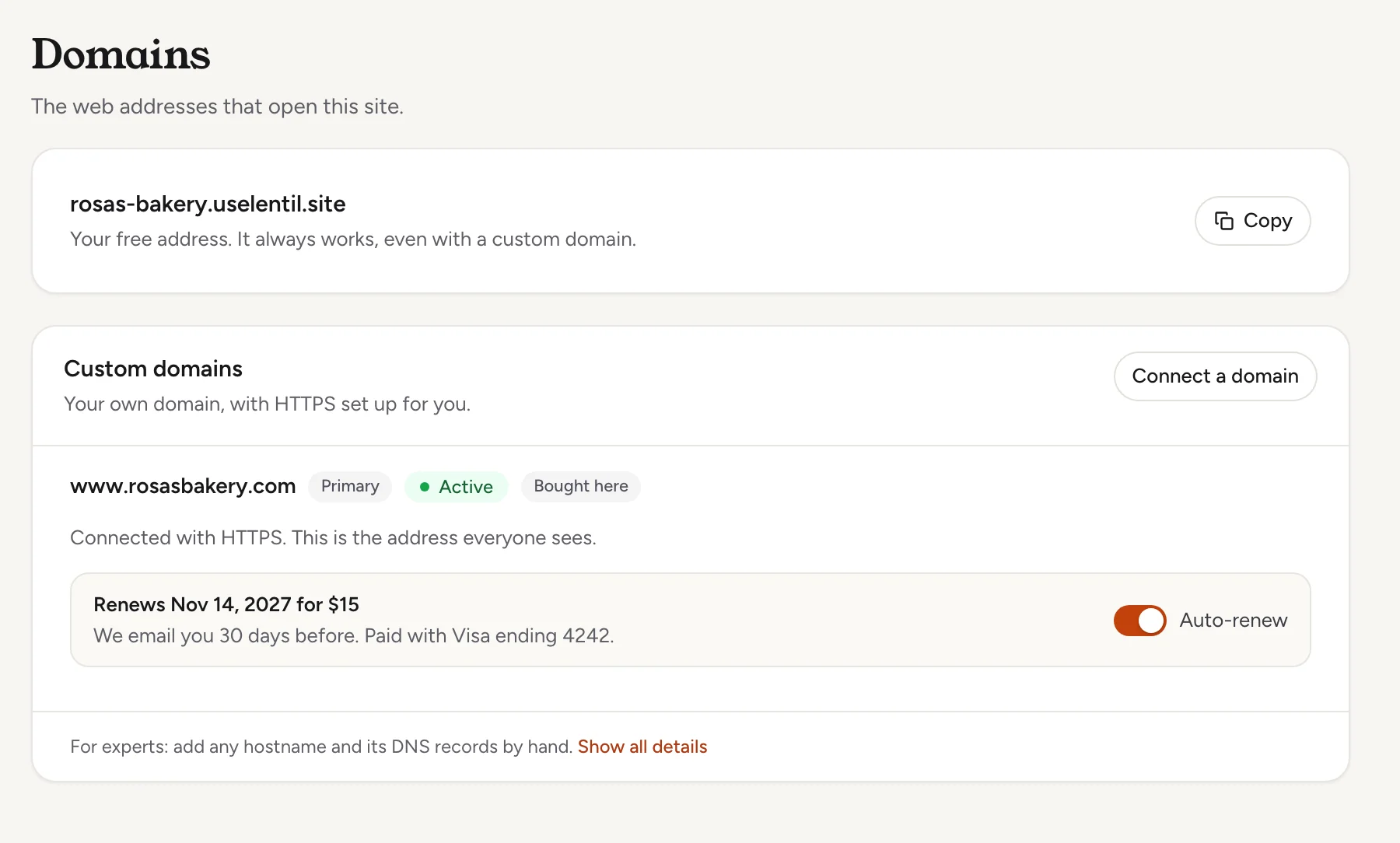
A domain bought in Lentil renews yearly. Under each active bought domain, a box shows Renews with the date and price, or Expires on the date when renewal is off, and an Auto-renew switch.
- With Auto-renew on, we email the workspace owners 30 days before and charge the saved card then. The email and the box say which card.
- With it off, the domain expires at the end of its term, and the owners get an expiry notice.
- If a renewal payment fails, the box says The renewal payment failed. Update the payment method in billing; we try again daily.
- A domain bought here is a Lentil domain: the trash button is not offered on it. To change it, contact support.
Who can use it
- Owners, admins and members can connect, check, make primary and remove domains, and ask for help. Clients can see the list but not change it. See Team and roles.
- Only a workspace owner can buy a domain and change its auto-renew.
- Every plan can connect its own domain. On a Free site the person connecting, buying or resuming it needs a verified email address.
Limits and edge cases
- A site can have up to 10 domains.
- A domain whose DNS is never set up is disconnected 14 days after you added it, so someone else can use it. With an open helper link or help request the limit is 30 days. The note under the domain shows the date.
- DNS changes usually take a few minutes and sometimes up to a day. HTTPS starts once the records are found.
- Enter the domain only, without
https://or a page path. - If your old website redirected between
wwwand the plain address, a browser that remembers it can loop. The steps warn you before you start, and a private window shows the new site. - Custom domain connections are unavailable on an environment without them. The page says so.
Inactive Free sites
A Free site with its own domain that has had no edits and no visitors for 90 days has its domain paused. The site stays online at its free address, and your DNS settings stay as they are.
- After 76 quiet days, the workspace owners get an email with the pause date, at least 14 days ahead.
- Opening the site in Lentil or making any edit before that date keeps the domain. Nothing else is needed.
- On the date, the domain shows Paused and the owners get an email. Press Resume domain in Settings, Domains to bring it back; it is usually live again within minutes.
- Plus and Pro sites are never paused. Upgrading a site to a paid plan resumes its paused domains automatically.
- While domains are paused, resume them before connecting or buying another one.
From an AI assistant
An assistant connected to Lentil works with your role. See AI assistants.
list_domains: the site's domains with status, records still missing, primary, open helper links and bought domains' renewal details.detect_domain_provider,get_domain_steps,start_guided_connect,start_domain_connect: find the provider, get the steps, and start a guided or one-click connection.start_domain_connectreturns a link for you to open and approve; an assistant never changes your DNS.add_domain,check_domain,remove_domain: add a hostname by hand, check it, and disconnect it.get_domain_live_check: the same progress the app's connection steps show for a domain the site is connecting, with the stage (waiting,partial,securingorconnected) and rows forwww, the root domain, the padlock and email. Use it to poll while you change DNS. Unlikecheck_domainit does not force a re-check, and it only finishes connecting a domain whose DNS already points to Lentil, at most once a minute, like the app.create_domain_helper_link,revoke_domain_helper_link,request_domain_help: send the steps to someone else, turn a link off, or ask us to help.suggest_domains,buy_domain,set_domain_auto_renew: find and buy a domain, and turn yearly renewal on or off (owners only).resume_domain: bring back a Free site's domain that was paused for inactivity.get_siteandlist_domainsshowdomainPausedAtwhen it is paused anddomainPauseAtwhen a pause is planned.
Safety rules: buy_domain buys nothing until you agree. The first call returns a quote and the owner details; the assistant must show them, then call again with confirmed: true and the quote's expectedTotal. With no saved card it returns a Stripe Checkout link for you to pay. remove_domain should be confirmed with you first. Making a domain primary is done in the app.
Updated 9 November 2026