
Search Console
Link your site to Google Search Console to see the searches, pages, clicks and positions that bring people to it, and which of your pages Google has added to search. Lentil sets up the verification for you and keeps the numbers up to date.
Connect a Google account
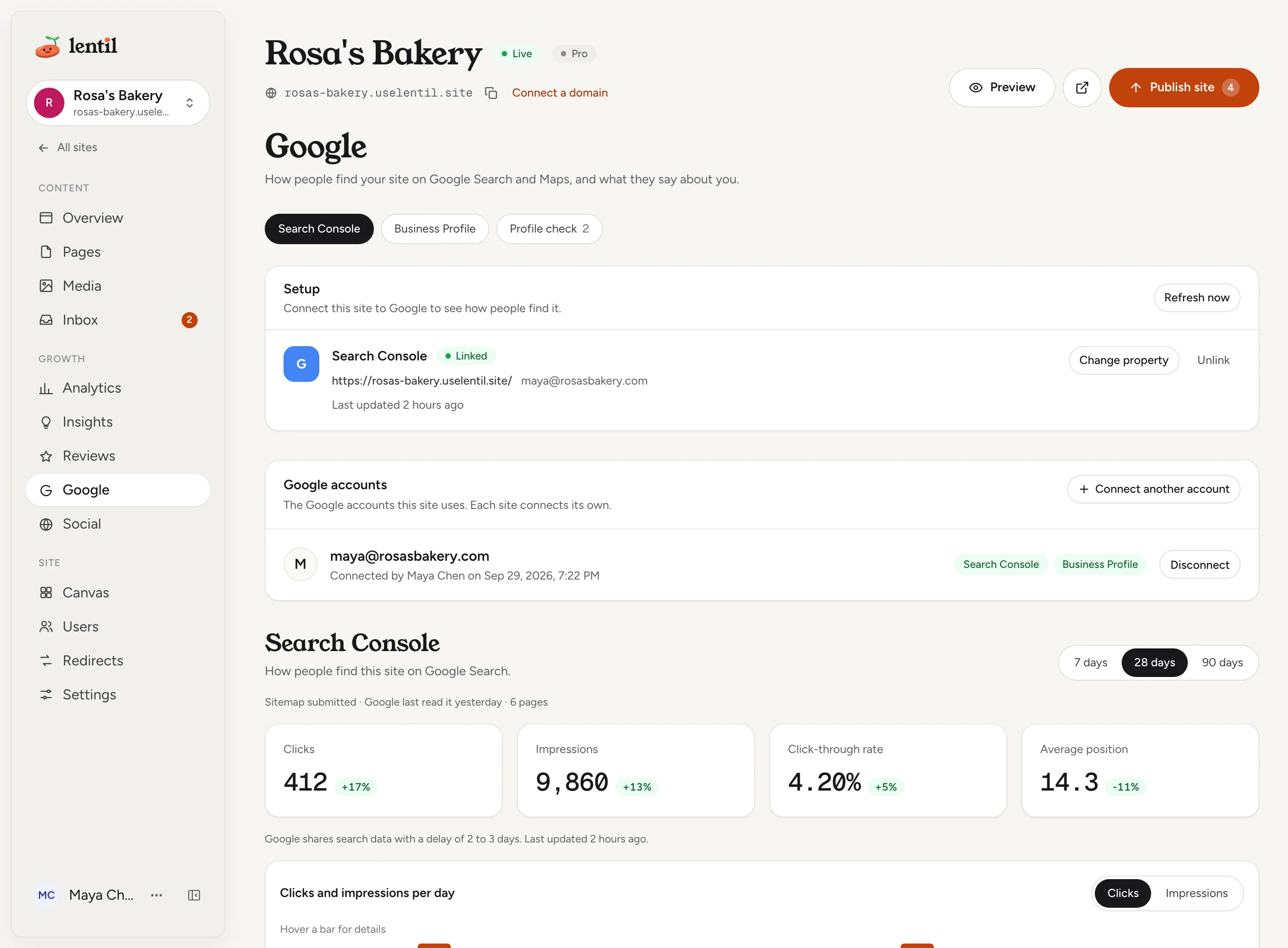
Open Google in the site's sidebar, under Growth. Each site connects its own Google accounts, so connecting one on another site does not connect it here.
- In the Setup card, find the Search Console row and press Connect Google.
- Choose the Google account that owns your Search Console property, or that can own it, and approve the permissions. Tick every permission Google lists: otherwise the account shows Some permissions were not granted and you need to reconnect it to use every Google feature.
- You come back to the Google page. The account now appears under Google accounts, with the email, who connected it and when.
Press Connect another account in Google accounts to add a second one, for example if your property belongs to a different Google login.
Link Search Console
Once an account is connected, press Set up Search Console on the Search Console row. Lentil does the rest for a site it hosts.
- Lentil adds the small file Google needs to confirm the site is yours. The row shows Verifying with Verifying with Google, this can take a minute. The page checks again every few seconds.
- When Google confirms, the badge changes to Linked and the row shows the property and the account.
- The first import of your search data takes a minute or two. Until then you see a note that the data is being imported.
If the account already has a matching property, Lentil uses it as it is. To pick one yourself, press Choose property. In Set up Search Console, press Set up automatically, or choose a property under Or use a property you already have. Properties that match your site are marked Matches this site and listed first. Each shows your access level: Owner, Full access or Read only work; a property marked Not verified cannot be chosen.
To switch later, press Change property. If something went wrong the badge says Needs attention with the reason, and Retry tries again.
Connect Search Console for my Rosa's Bakery site. Use the Google account that is already connected, show me which property you will use, and tell me when the first data is in.Uses get_site_google, list_google_properties, link_search_console. Connect an assistant
Sites hosted elsewhere
For a website you keep with its current host (see Already have a website), Lentil never adds a verification file to your site. Verify your address in Google Search Console through your hosting or DNS provider first. Then open Choose property: the dialog says to choose an accessible matching property, and only properties that match your address can be picked.
Read your search data
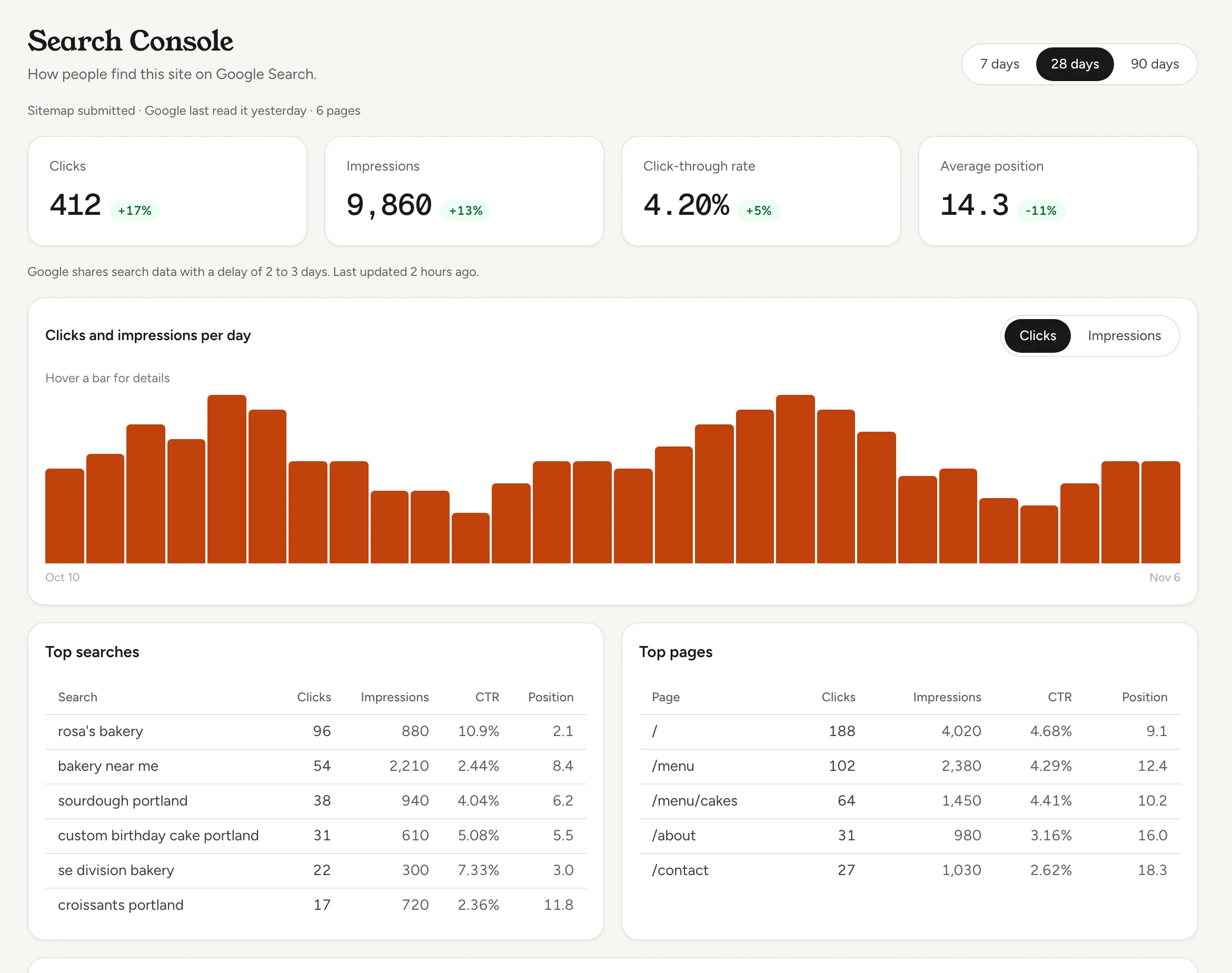
When the link is active, the Search Console section shows how people find the site on Google Search. Use Date range to pick 7 days, 28 days or 90 days.
- Clicks: how often someone clicked through to your site from Google.
- Impressions: how often your site appeared in results.
- Click-through rate: clicks divided by impressions.
- Average position: where your pages ranked on average. Lower is better, so a drop in the number is good news.
Each number shows the change against the previous period of the same length. Under them are the chart Clicks and impressions per day (switch between the two), and two tables: Top searches and Top pages, each with clicks, impressions, click-through rate and position.
Google reports search data two to three days late, so the newest days are not included. The note under the numbers says when Lentil last updated them. A brand new site can show No searches showed this site in this period yet for a few weeks.
How is Rosa's Bakery doing on Google over the last 28 days? Compare clicks and impressions with the 28 days before, and list the five searches and the five pages that bring the most clicks.Uses get_search_console. Connect an assistant
Refresh and keep it updated
Lentil refreshes your search data every day. To pull it sooner, press Refresh now in the Setup card. A product refreshed in the last 10 minutes, or already refreshing, is skipped, and the note under the button tells you.
If a refresh fails, the row says The last refresh failed with the reason. The most common cause is an account whose access ran out: see Accounts and disconnecting.
Your sitemap
For a site Lentil hosts, Lentil submits your sitemap to Search Console on the first refresh after linking, and checks it on every refresh. A line under the section title shows what Google says, for example Sitemap submitted, when Google last read it and how many pages it lists.
- No sitemap is served yet: nothing is published, or search indexing or the sitemap is turned off. Press Open search settings to check.
- A warning that the account can read data but cannot submit sitemaps: ask the property owner for Full access, or submit the sitemap address in Search Console yourself.
- A warning that Google found errors in the sitemap: open the sitemap in Search Console to see them.
The settings behind the sitemap, search titles and indexing are in SEO and AI visibility.
Which pages are on Google
Under the search numbers, the On Google card shows which of your published pages Google has added to search, such as 9 of 12 pages are on Google. Each page has a status:
| Status | Meaning |
|---|---|
| On Google | Google has indexed the page. |
| Not on Google | Google has not added the page to search yet. |
| Left out | Google chose not to list it, for example because it is a duplicate. |
| Problem | Google reported an error for the page. |
| Not checked | The page has not been checked yet. |
For every page you see, in plain words, what Google says, what to do about it, and when Google last crawled it, plus Open in Search Console for the full report. After you fix a page, press Check now (or Check again) on its row to ask Google right away. The first check of your pages after linking takes a minute or two, and pages are checked again every week.
Pages you hide from search and the 404 page are not checked. If search indexing is turned off for the site, the card tells you and links to the site's search settings.
Which pages of Rosa's Bakery are not on Google yet, and why? For any I can fix, tell me what to change. Then check the contact page again.Uses get_search_indexing, inspect_page_indexing. Connect an assistant
Accounts and disconnecting
If Google access for an account expires or is removed, the site shows Google access for [email] expired or was removed. Reconnect to keep data updating. with a Reconnect button. Lentil also emails the people who can manage the site once, not every day. Nothing is lost: the data already collected stays, and updates resume once you reconnect.
- To stop using an account, press Disconnect on its row in Google accounts.
- The confirmation lists what the site loses, for example This site loses its Google data for: Search Console. Your Google account itself is not changed.
- Press Disconnect to confirm.
To keep the account but stop showing search data, press Unlink on the Search Console row instead. That removes the imported search data for this site. You can set it up again at any time.
The Google connection for Rosa's Bakery stopped updating. Check what is wrong and give me the link to reconnect it.Uses get_site_google, connect_google. Connect an assistant
Who can use it
- Everyone with access to the site can read the search numbers and the On Google card: owners, admins, members and clients on a site shared with them.
- Connecting, changing, unlinking, Refresh now and Check now need permission to manage the site's settings: owners, admins, members, and clients on a site assigned to them. Others see Ask someone who manages this site's settings to set this up.
- See Team and roles for what each role can do.
Limits and edge cases
- Search Console data arrives two to three days late. The ranges end three days before today.
- The first link imports up to 16 months of daily history. After that, the most recent days are re-fetched on each refresh because Google revises them.
- The top searches and top pages lists keep the top 50 rows for each range.
- Refresh now skips a product refreshed in the last 10 minutes.
- A page can be checked again once every 10 minutes, and a site can run 50 page checks a day. Past either limit the button is off and tells you how long to wait.
- Automatic verification takes a minute or two. If Google cannot confirm in time, the row shows Needs attention and Retry.
From an AI assistant
An assistant connected to Lentil can do everything on this page with your role. See AI assistants.
get_site_google: connected accounts, link status, errors, last update and the sitemap as Google reports it.connect_google: returns a Google sign-in link for you to open (also for reconnecting). Consent always happens on Google's own screen. The link expires after 15 minutes.list_google_properties,link_search_console,unlink_search_console: choose and link a property, or remove the link and its stored data.get_search_console: totals, changes, daily series, top searches and pages for 7d, 28d or 90d.get_search_indexingandinspect_page_indexing: the On Google report and a fresh check of one page.refresh_google_data: refresh now.disconnect_google: lists what the site would lose; nothing is removed until it is called withconfirmed: trueafter you agree.
Updated 9 November 2026